

Disclosure: This post mentions AI tools I may link to later. If I add affiliate links, I may earn a small commission at no extra cost to you. I only recommend tools I actually use or test.
Every list of the best free AI writing tools says the same thing: they’re all “great”. That didn’t help me decide which one to open when I needed to write an awkward client email.
So I ran my own test. Same prompt, four tools, one day. Here’s what each one wrote, how I scored it, and which one I’d pick for different jobs.
One honest note before we start: this was one writing test, not a full review. It tells you how each tool handled a short, real-world email. It doesn’t tell you everything each tool can do.
Why I tested the best free AI writing tools myself
Most of my writing outside ForgeAstute is practical: updates, follow-ups, quick explanations to people who are busy. That kind of writing needs to be clear, polite and short.
Free AI tools are good enough for this now. The real question is which one gets closest to “ready to send” with the least editing. If you’ve read how I use an AI assistant to plan my work week, you’ll know I treat AI output as a first draft. I wanted to know which draft needs the fewest fixes.
How I tested
To compare the best free AI writing tools fairly, I kept the test simple:
- Same prompt in every tool, pasted word for word.
- Same day for all four tools.
- Free versions of all four tools. (I first ran Claude on a paid model by mistake, so I re-ran it on the free plan. The results below are from the free version.)
- No follow-up edits unless the tool forced one.
This is the prompt I used:
“Write a short, friendly email (under 120 words) to a client explaining that their project will be 2 days late because of a supplier delay. Apologise once, give the new delivery date as Friday, and offer one small extra to make up for it. Use a professional but warm tone.”
I scored each reply out of 5 on three things: did it follow the brief, does the tone feel human and warm, and how much work is left before I could send it.
Copilot: 3/5
What it did well
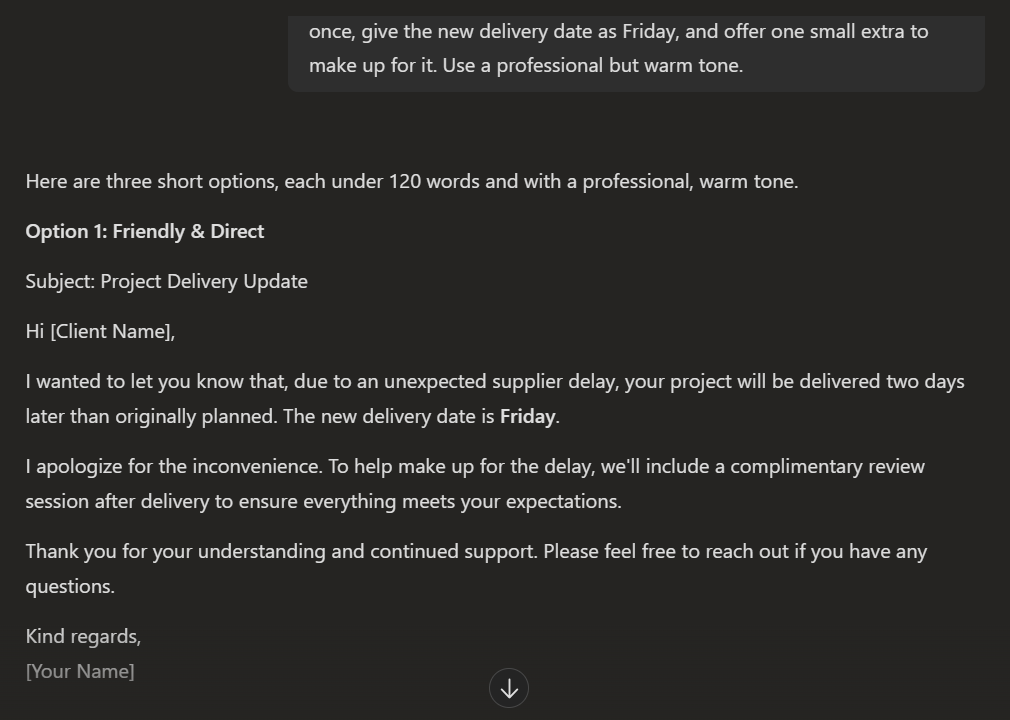
Copilot’s first email was solid. It explained the supplier delay, gave Friday as the new date, apologised once and offered a complimentary review session. The tone was professional and polite.
Downsides
I asked for one email and got three. That sounds generous, but it means more reading and more choosing. When I want a quick draft, options slow me down.
Free plan: Microsoft describes Copilot as having a free baseline experience, with a paid Microsoft 365 Premium plan offering higher usage limits. Some features need a Microsoft account sign-in.
Claude: 4/5
What it did well
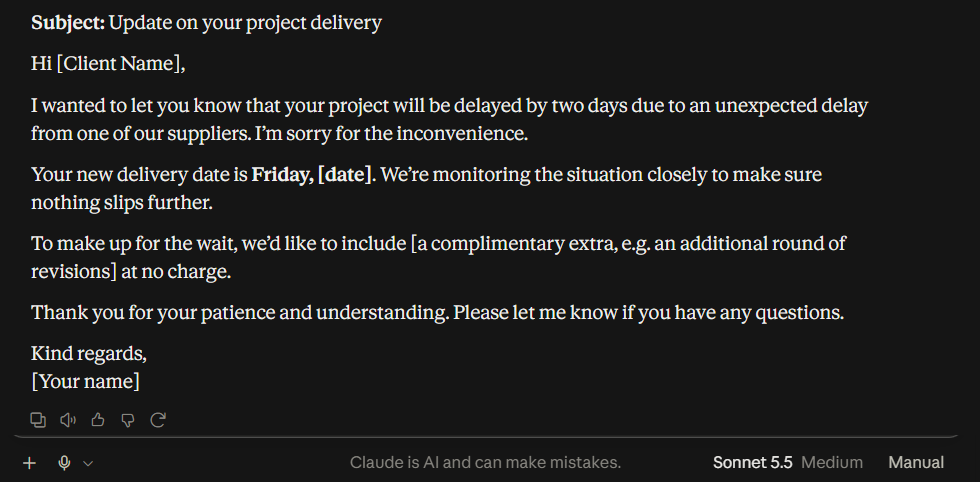
Claude’s free version (Sonnet 5.5 on my account) wrote the shortest email of the four. It put the reason and the single apology in the first paragraph, gave Friday as the new date, and added a reassuring line about monitoring the situation so nothing slips further.
Downsides
Straight to the point and clear, but it skipped the warm greeting I look for when delivering bad news. Like Gemini, it also left the extra as a placeholder (it suggested an extra round of revisions), so you need to fill it in before sending.
Free plan: Claude’s pricing page lists a $0 plan with chat on web, desktop and mobile, and access to its Sonnet and Haiku models. Usage limits reset on a rolling five-hour window.
ChatGPT: 4/5
What it did well
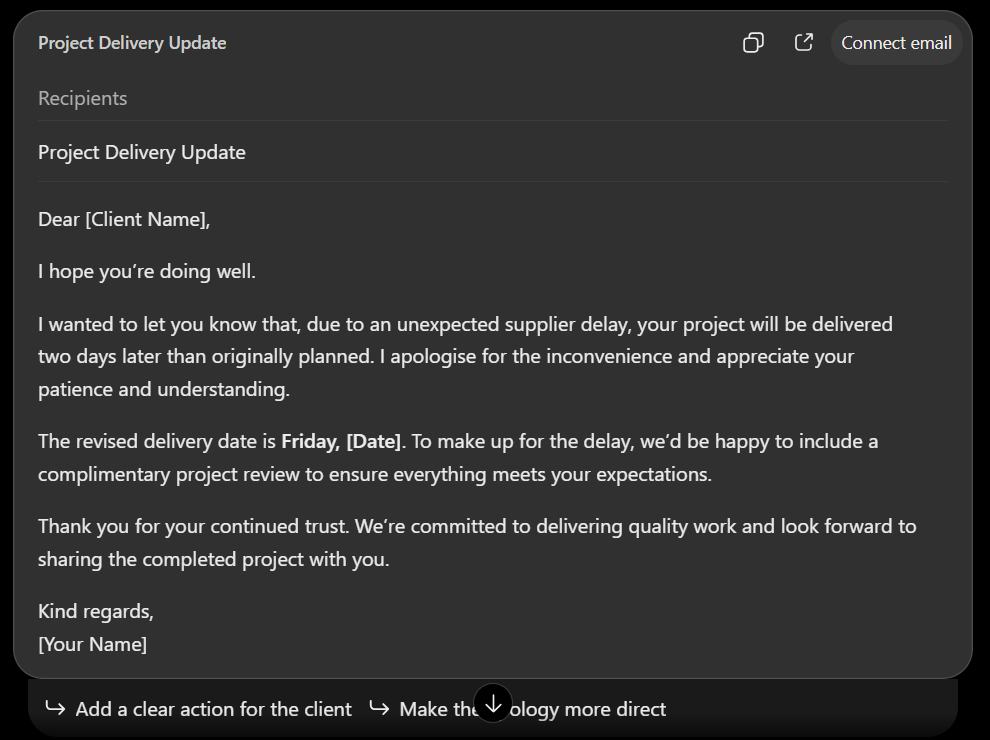
ChatGPT followed the brief cleanly. One apology, the revised date in bold, a complimentary project review as the extra, and a polite sign-off. It also put the draft in an email card that was easy to copy.
Downsides
It was a little generic. Lines like “Thank you for your continued trust” are fine, but they sound like every other business email. It also showed a “Connect email” button, which I didn’t need for this test.
Free plan: OpenAI’s pricing page lists text chats on the free plan as unlimited, subject to abuse guardrails, with limits on uploads, image creation, voice and deep research.
Gemini: 5/5 (the winner)
What it did well
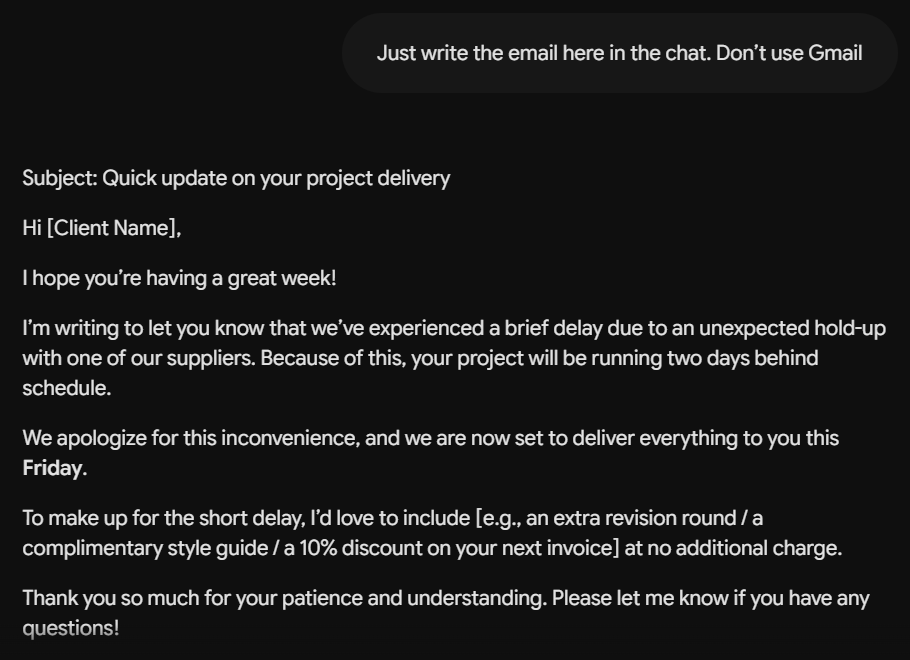
Gemini wrote the warmest, friendliest email of the four. It sounded like a person who cares about the client, not a template. It also gave me several ideas for the extra (an extra revision round, a style guide or a discount), so I could pick the one that fits.
Downsides
Two things to know. First, it tried to use my Gmail before writing anything, and I had to ask it to just answer in the chat. Second, it left the extra as a placeholder in square brackets, so you must choose one and edit it before sending.
Free plan: Google’s subscriptions page lists the free plan at $0 with a Google Account. It notes that rate limits may apply.
Why I scored warmth so highly
For me, tone mattered more than speed. When you’re telling a client about a delay, you’re delivering bad news, and how you say it shapes the relationship. Claude went straight to the point. Gemini opened by asking how the client’s week was going. That small human touch matters to me. I believe business relationships should go beyond the money and be handled with the same care you’d give family. That’s why Gemini scored highest, even though it needed a nudge to stay out of Gmail.
Comparison table: best free AI writing tools tested
| Tool | My score | Best for | Watch out for |
|---|---|---|---|
| Gemini | 5/5 | Warm, friendly emails | Tries to use Gmail first; leaves placeholders |
| Claude | 4/5 | Short, clear drafts | Plain tone; leaves the extra as a placeholder |
| ChatGPT | 4/5 | Clean, professional drafts | A little generic |
| Copilot | 3/5 | Getting several options | Gave three emails when asked for one |
My verdict: the best free AI writing tools for different jobs
Pick Gemini if tone matters most. For apologies, delays and anything where the reader’s feelings count, its draft needed the least softening. Just remember to fill in the placeholder.
Pick Claude or ChatGPT if you want something quick and clean. Both followed the brief closely. Claude was shorter; ChatGPT was more polished but more generic.
Pick Copilot if you like choosing between options. If you know what you want, ask it for “one email only” to save time.
Whichever you choose, read the draft before sending. Check names, dates and anything the tool promised on your behalf. An AI can happily promise your client an extra you can’t actually give.
If you plan your week with AI too, my 5-step weekly planning system shows where quick drafting tasks like this fit, so they don’t eat into deep work.
FAQ
Are free AI writing tools good enough for work emails?
For short, everyday emails, yes. All four tools in my test produced a usable draft. Expect to edit names, dates and details, and never paste confidential client information into a chat.
What are the best free AI writing tools in 2026?
In my test, Gemini won for tone. But “best” depends on the job. For quick, clean drafts, Claude and ChatGPT were close behind. Try the same prompt in two tools and keep the one you edit less.
Is it OK to publish AI-written content on a blog?
Google says it rewards helpful, original content however it’s produced. Its guidance on AI-generated content is worth reading. I use AI for drafts and outlines, then add my own testing and opinions, like the results in this post.
Conclusion
Four free tools, one prompt, four different personalities. Gemini wrote the warmest email, Claude the shortest, ChatGPT the cleanest, and Copilot gave the most options.
None of them was perfect, and that’s the useful lesson: the best free AI writing tool is the one whose first draft is closest to how you’d write it yourself. Run my prompt in the tools you already use, and see which one you edit least.
I’ll keep testing tools like this with real tasks. If you want the next test in your inbox, sign up for the ForgeAstute newsletter below.
Leave a Reply